


AI Assisted CTF: Same Systems. Two Scans. Before and After Saner
What changed when AI tested the lab before and after Saner reduced the usable attack surface
Before Saner, AI had many easy assumptions to use. After Saner, AI still tested deeply, but the old paths no longer joined together into root-file access.
Executive summary
I built a lab and asked an AI assistant to go after it the way an attacker would once before Saner was in place, and again after Saner had cleaned it up. This is the story of what changed between those two runs.
Before Saner, the AI had an easy job. It assessed the environment, mapped the full attack surface, and found vulnerabilities and misconfigurations across every kind of asset. It matched what it found to real, known weaknesses, safely confirmed which ones were actually usable without launching a single destructive exploit, and laid the findings out as a prioritized list of what to fix first. From there, it chained the weak points together and reached real impact inside the lab.
After Saner remediated the environment and I scanned again, the AI did not stop testing. It kept probing just as hard. The difference was that the easy assumptions were gone, the paths that once led to impact no longer connected. Saner did not make the AI blind. It removed the conditions the AI needed to turn findings into impact.
The story so far
This article is the second part of the AI lab research story. In the first write-up, the key observation was that AI did not need a dramatic zero-day to become useful. It turned ordinary security questions into a repeatable workflow: map the host, validate reachable services, compare package and runtime state, inspect local privilege boundaries, prove bounded impact, then retest after fixes.
Read the previous lab-server article.
This second article continues that story with a larger lab: Debian, Windows, routers, switches, firewalls, VPN surfaces, and management-plane evidence.
The lab I handed to the AI
Before installing anything, I handed the AI a lab to test. This time it was not a single Debian server — the environment spanned endpoints, Linux, routers, switches, firewalls, VPNs, and their management planes. That breadth matters, because the AI does not reason from a CVE list alone. It connects reachability, versions, services, credentials, protocols, and likely control-plane impact into one picture.
Lab device map
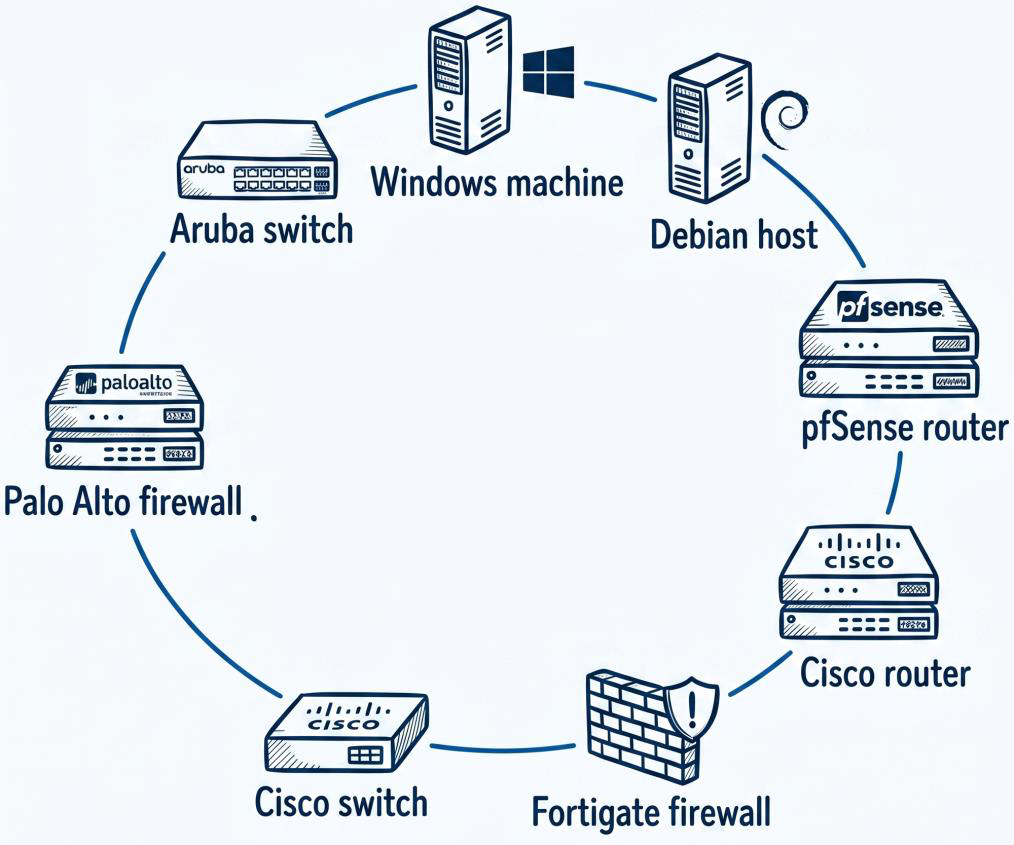
This device map shows the breadth of the environment: Windows, Debian, Aruba, Palo Alto, pfSense, Cisco, and Fortigate assets were all part of the AI reasoning surface.
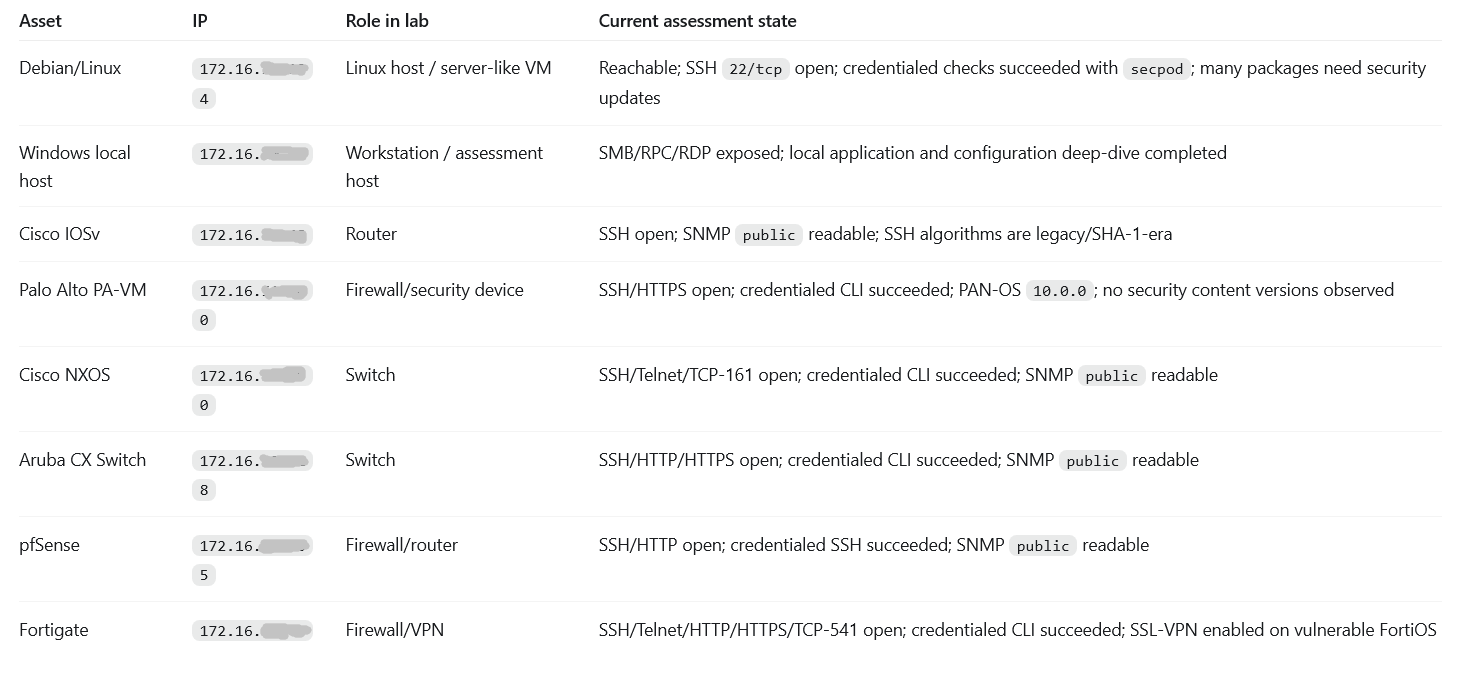
Scope and current asset state evidence
This is the assessment evidence. It shows which assets were reachable, which management services were exposed, and where credentialed checks succeeded, the ground truth the AI reasoned from before any exploit logic.
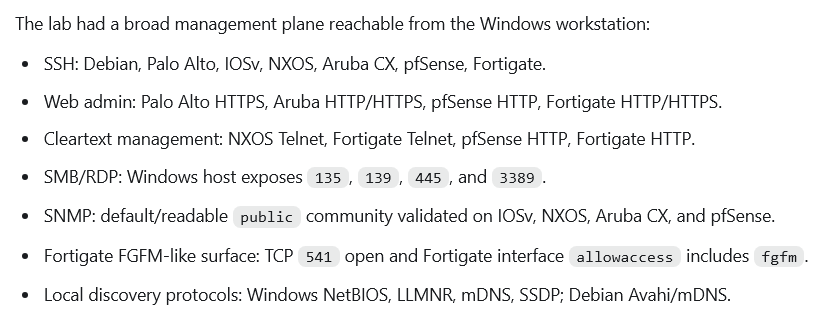
Before Saner: one connected attack surface
From the first pass, the AI did not see a list of isolated bugs. It saw a graph. SSH, RDP, SMB, public SNMP, Telnet, HTTP admin panels, SSL-VPN, weak policy, outdated software, and credentialed management all became connected clues. The lab was easy to prioritize because most findings pointed straight to an obvious next step.
AI attack surface summary evidence
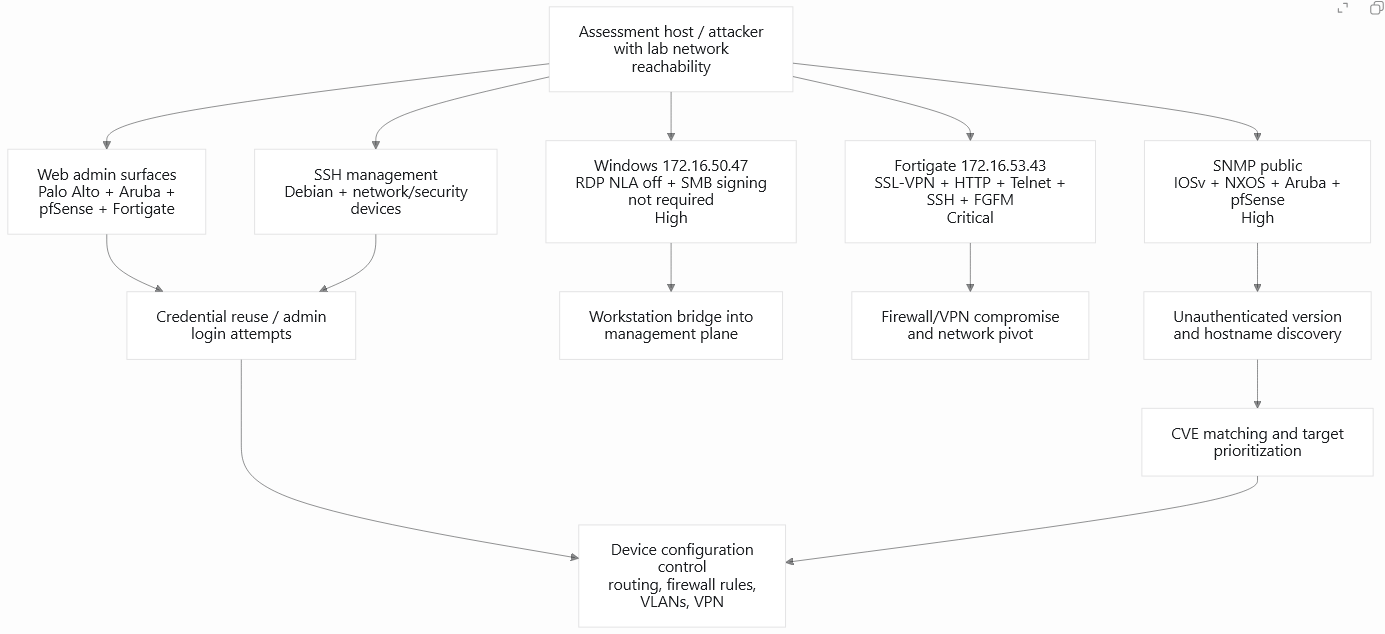
AI attack surface graph
The graph below shows how AI connected lab reachability to web admin surfaces, SSH management, SNMP discovery, CVE matching, credential reuse, and device configuration control.
What to notice
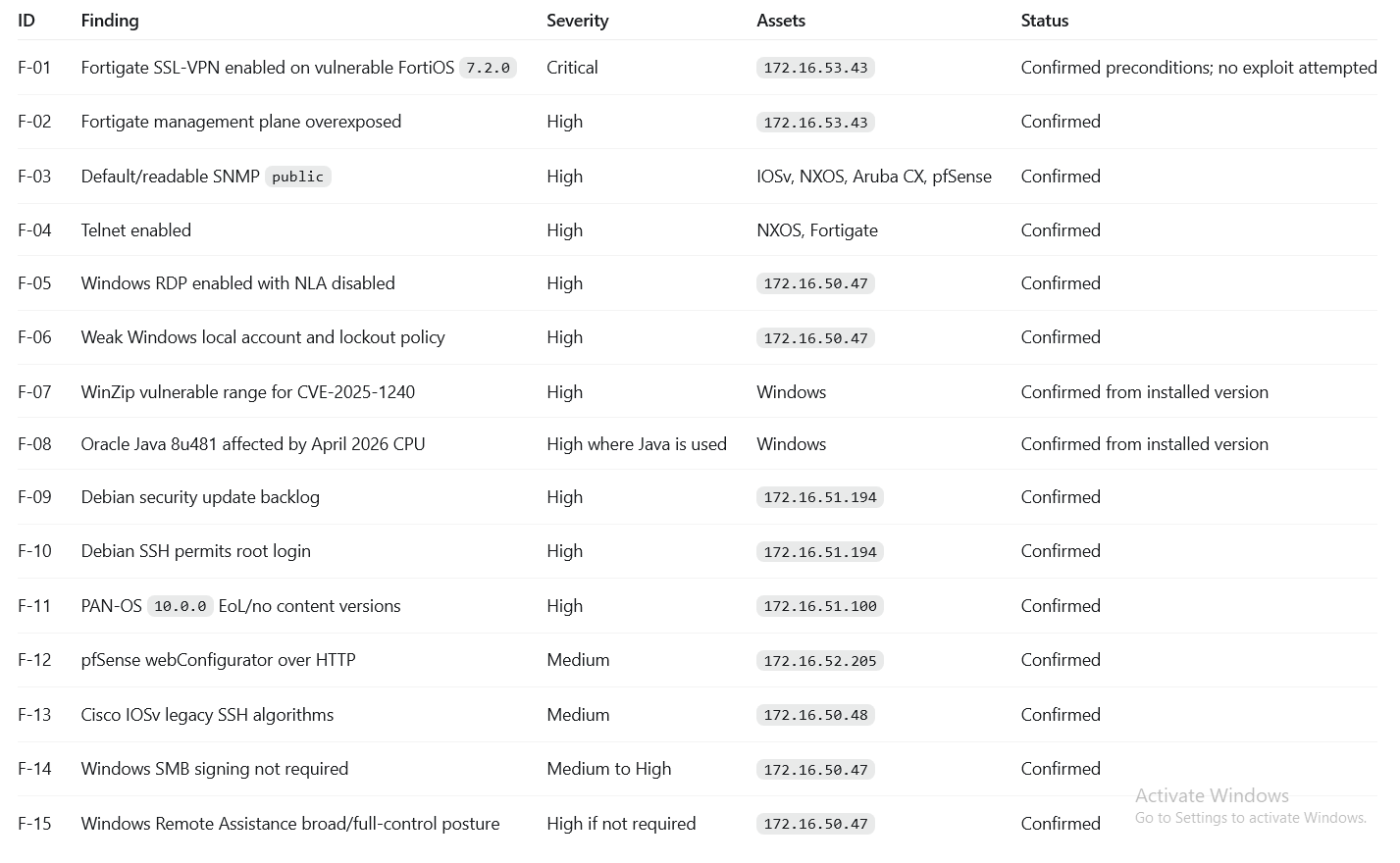
- Debian was not the only risk. AI also confirmed Fortigate SSL-VPN exposure, Windows RDP/SMB policy gaps, SNMP public, Telnet, old applications, and network-device management risk.
- The screenshot remains the evidence table, so the blog does not repeat the same rows as a second table. The text explains why the rows matter.
- The key pattern was composition: each confirmed item gave AI another clue for prioritization, chaining, or retest.
The highest-priority findings
Pulled together, the high-priority evidence showed how much was exposed at once: confirmed, practical risk across Fortigate, Windows, Debian, Palo Alto, pfSense, Cisco, and every SNMP-enabled device in the lab. This was the ranked picture the AI handed back, a clear view of what an attacker would reach for first.
What the AI found on Linux
The Debian host became the strongest before/after proof point because it had both broad exposure and measurable remediation evidence. Before hardening, the assessment recorded 43 evidence-backed findings: 2 Critical, 16 High, 22 Medium, and 3 Low. It also recorded 5,054 raw Debian Security Tracker candidates before normalization. That raw number was not the final exploitability count, but it showed why automated normalization and remediation mattered.
What the Debian evidence shows:
- Credential and SSH policy were risky: SSH was reachable, password authentication was usable, and root SSH exposure was part of the original risk picture.
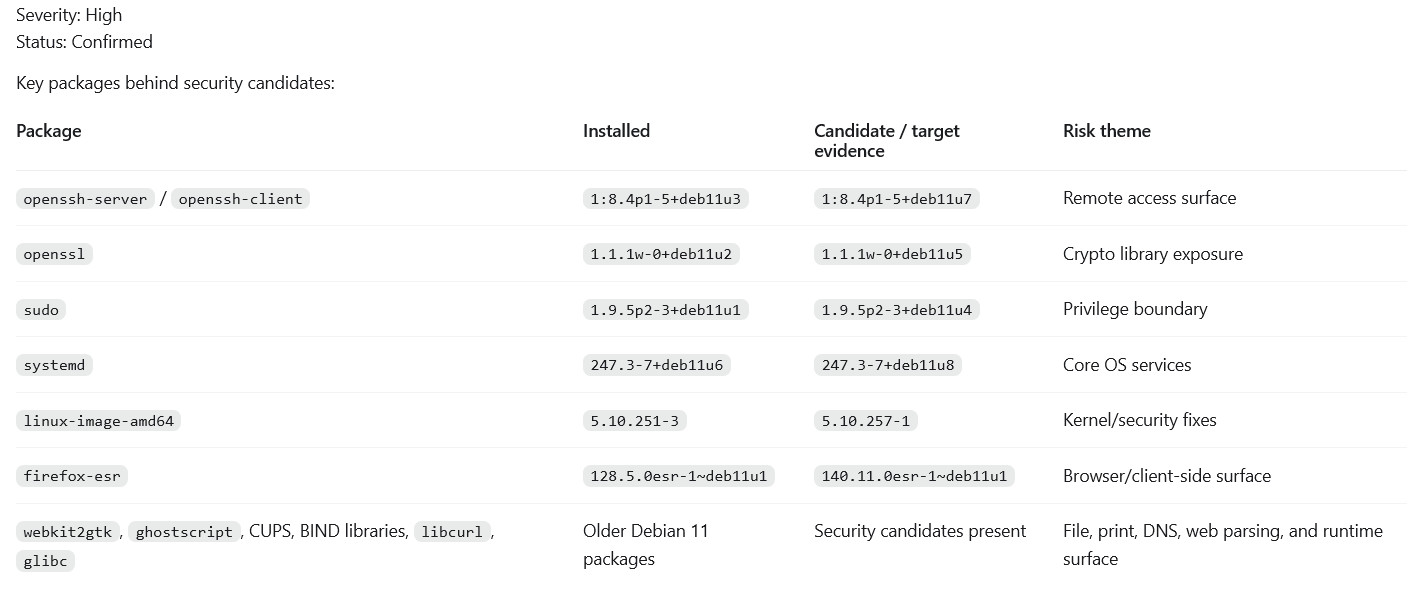
- The patch backlog was broad: OpenSSH, OpenSSL/libssl, sudo, systemd, kernel packages, Firefox ESR, WebKitGTK, Ghostscript, CUPS/BIND libraries, glibc, and libcurl all appeared in the security-update story.
- Runtime state mattered: the earlier kernel lesson showed that installed fixes do not help if the system is still booted into the vulnerable kernel.
- Local services and privilege boundaries mattered: CUPS, PackageKit, Polkit, D-Bus, broad groups, and weak kernel/sysctl posture gave AI many local questions to test.
Debian pending security updates evidence
The Debian screenshot showed key packages behind security candidates, including OpenSSH, OpenSSL, sudo, systemd, the kernel package, Firefox ESR, WebKitGTK, Ghostscript, CUPS/BIND libraries, glibc, and libcurl.
Debian attack path
The Debian path shows how AI moved from SSH, root SSH, password SSH, patch backlog, and local service discovery toward credential foothold and local escalation candidates.

What the AI found on Windows
The Windows host mattered because it could become a workstation bridge into the management plane. The findings were not only vulnerable applications. They also included configuration choices that can help credential capture, relay, discovery, and remote foothold workflows.
What the Windows evidence shows
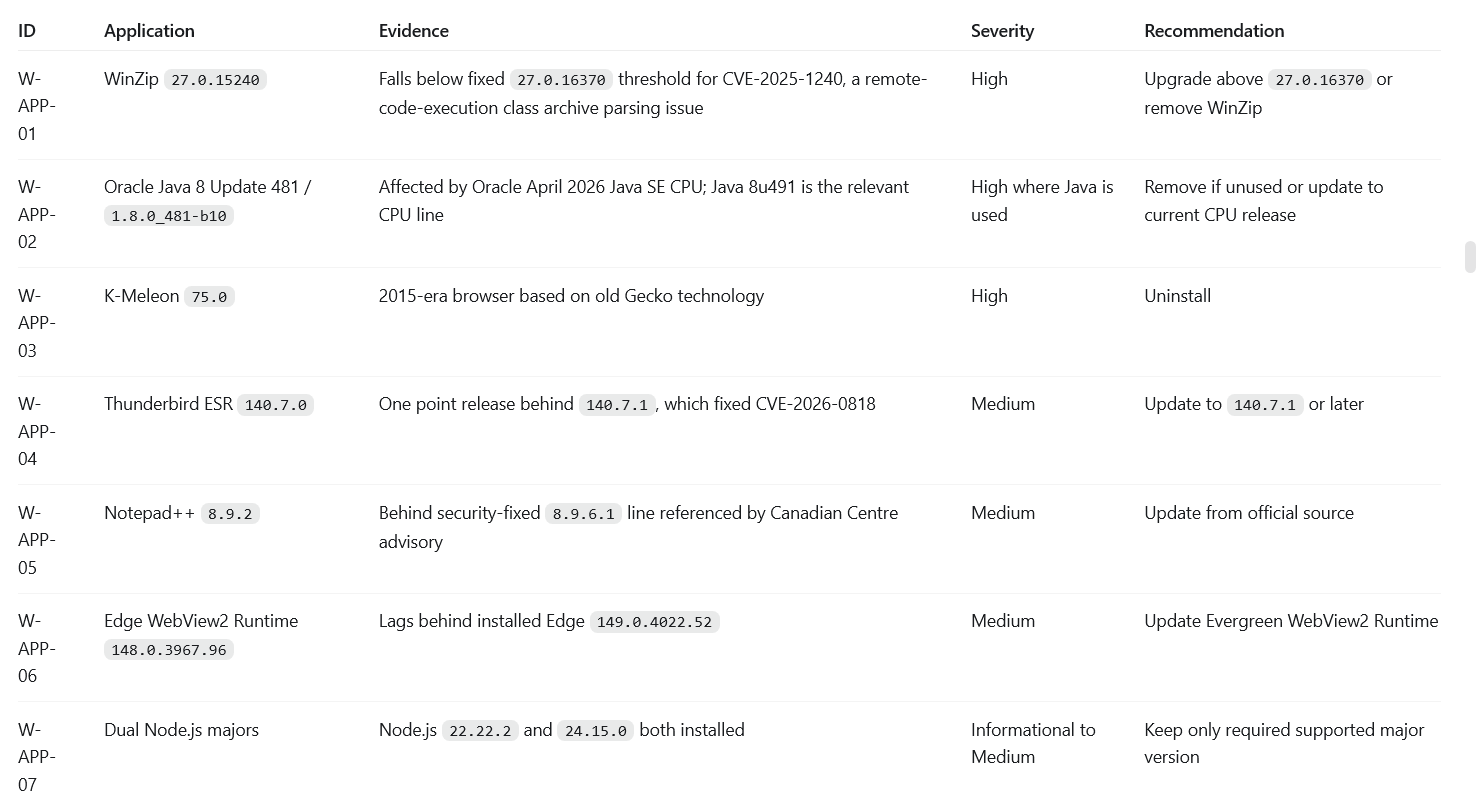
- Application risk was practical: WinZip, Java, K-Meleon, Thunderbird, Notepad++, WebView2, and multiple Node.js major versions gave AI user-side and parsing-surface questions.
- Configuration risk was equally important: RDP with NLA disabled, SMB signing not required, and weak local account/lockout posture can support foothold, relay, and management-network bridge scenarios.
- Defender existed, but hardening was incomplete. AI treated that as a control-quality question, not as proof that the host was protected.
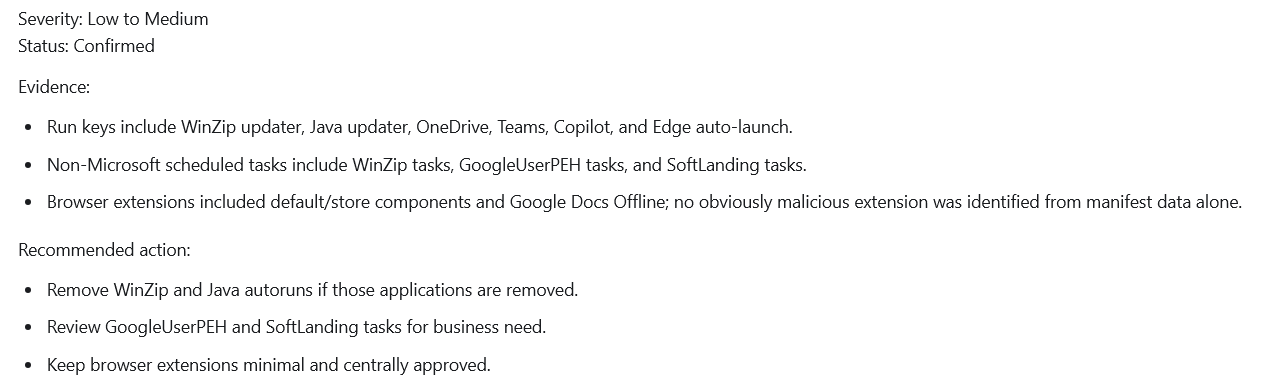
- Legacy discovery protocols and autoruns were not automatically impact paths, but they widened what AI could inspect and prioritize.
Windows application vulnerability evidence
The app evidence showed outdated or risky desktop software such as WinZip, Java, K-Meleon, Thunderbird, Notepad++, WebView2, and multiple Node.js major versions.
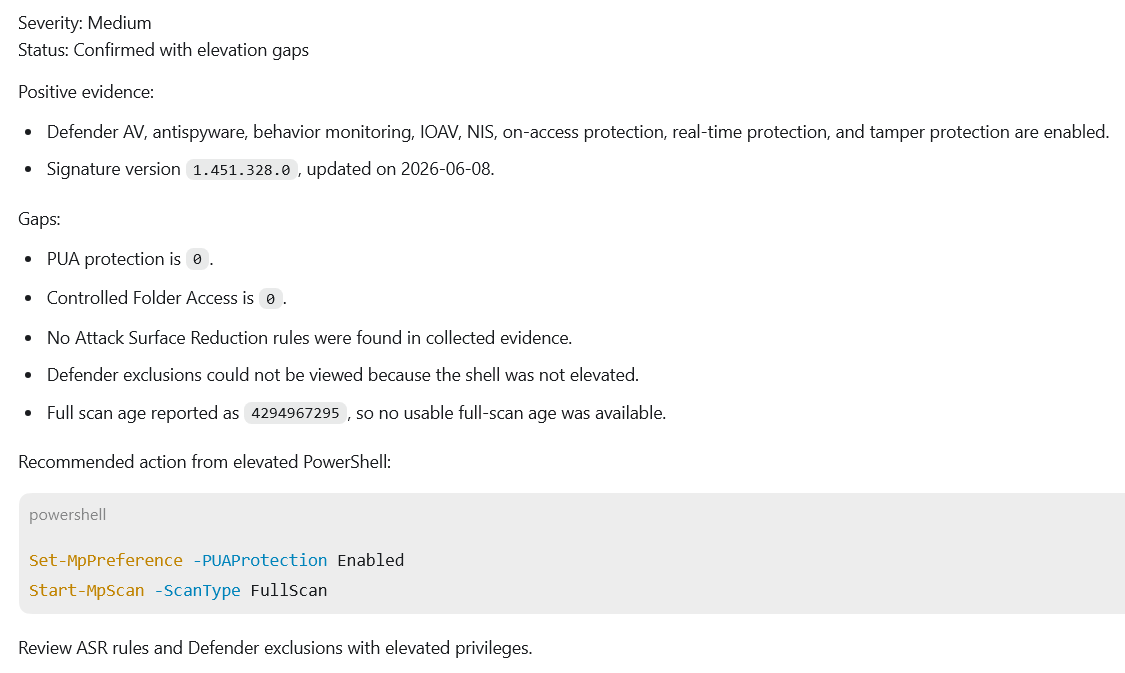
Windows Defender hardening evidence
Defender was present, but hardening was incomplete: PUA protection and Controlled Folder Access were disabled, ASR evidence was missing, and exclusions needed elevated review.
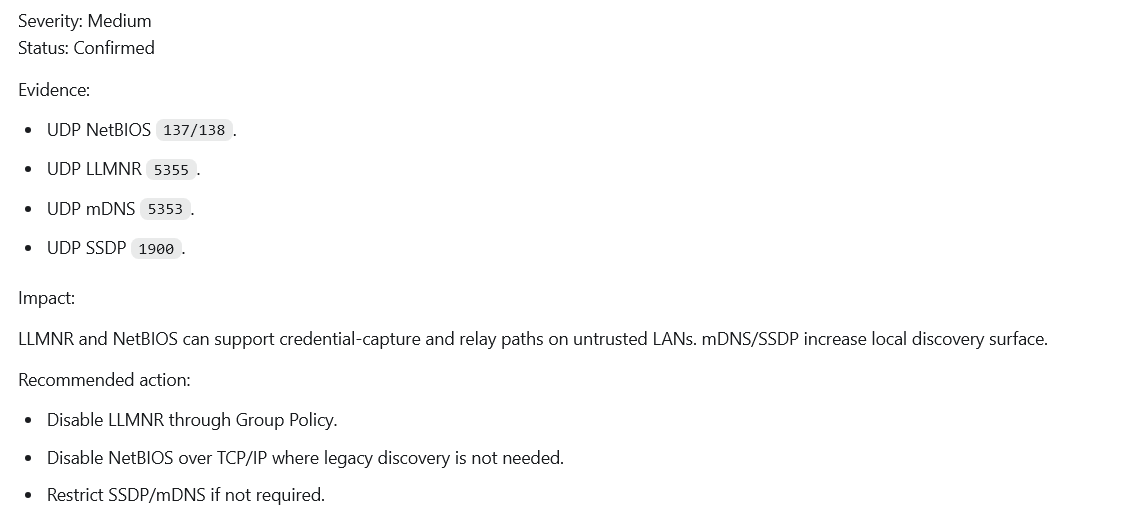
Windows legacy discovery protocol evidence
LLMNR, NetBIOS, mDNS, and SSDP increased local discovery and relay surface. These are classic examples of configuration risk that can matter even without a fresh CVE.
Windows autoruns and updater tasks evidence
Autoruns and scheduled tasks added persistence-like review surface. In this lab they were mostly hygiene findings, but AI still checks them because they can become execution or drift paths.
Windows attack path
The Windows path shows how exposed RDP/SMB/RPC and weak policy could become a remote foothold and a management-network bridge.

What the AI found across the network
The network and security devices made the lab more realistic. AI could connect to SNMP, Telnet, SSH, web admin, SSL-VPN, firmware trains, and credentialed CLI access into likely control-plane outcomes. This showed that the risk was bigger than a server patch list.
What the network/security evidence shows:
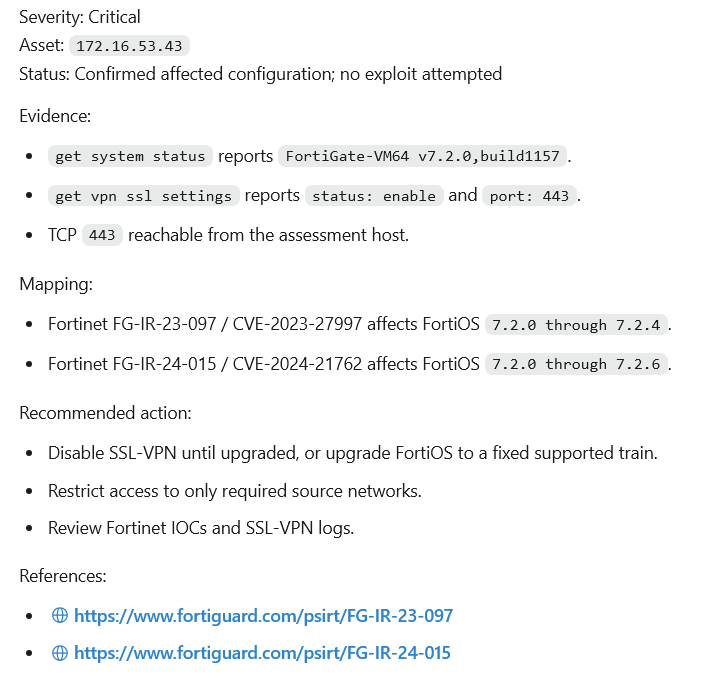
- Fortigate was the highest-risk device because SSL-VPN, HTTP/Telnet/SSH/FGFM, and vulnerable FortiOS context created firewall/VPN pivot risk.
- pfSense, Cisco NXOS, Cisco IOSv, Aruba CX, and Palo Alto all exposed management-plane questions: HTTP/HTTPS admin, SSH, Telnet, SNMP public, legacy crypto, version gaps, and credentialed access.
- SNMP public and Telnet were especially useful to AI because they reveal topology, versions, and control-plane clues without requiring exploitation.
- The likely impact extended beyond device compromise. It included routing, ACL, VLAN, VPN, firewall-policy, and management-plane control.
Network and security device finding evidence
The evidence showed Fortigate SSL-VPN and management exposure, device management reachability, and vendor-specific configuration risk that must be remediated before it becomes a pivot.
Network and security attack paths
Fortigate attack path
SSL-VPN, HTTP/Telnet/SSH/FGFM, and vulnerable FortiOS context made firewall/VPN compromise and network pivot the critical scenario.

pfSense attack path
HTTP GUI, SSH, SNMP public, and OpenVPN evidence created firewall administration and VPN service abuse risk.

Cisco NXOS attack path
Telnet, SSH, SNMP public, and credentials connected to switch configuration compromise and topology discovery.

Cisco IOSv attack path
SSH and SNMP public combined with legacy algorithms to create router configuration and route/ACL manipulation risk.

Aruba CX attack path
HTTPS/SSH/HTTP/SNMP exposure produced switch management and VLAN/control-plane risk.

Palo Alto attack path
Management reachability plus end-of-life/content gaps created firewall policy and inspection risk.

Proving the findings were real without exploiting them
The evidence separated confirmation from unsafe exploitation. AI confirmed preconditions and reachability without needing copy-paste exploit steps. The point is to show that the weaknesses were real and usable enough to prioritize.
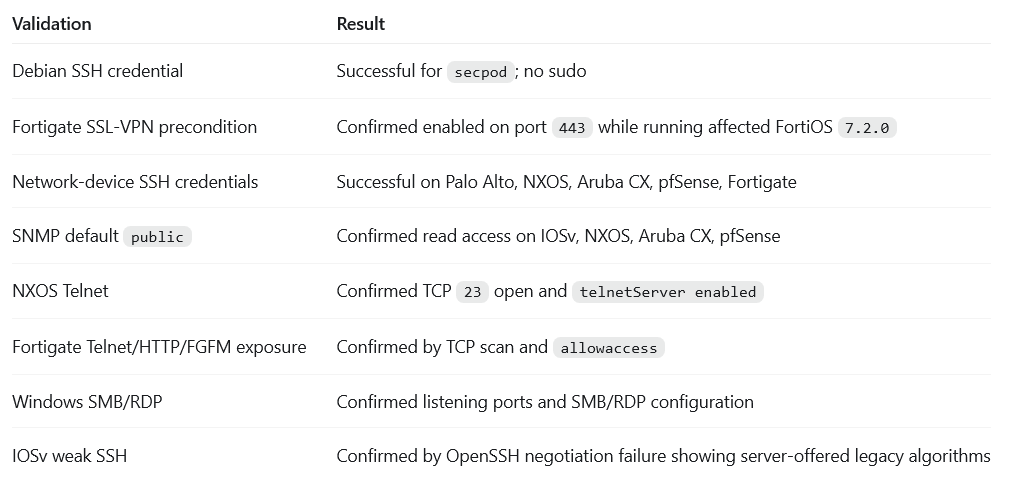
What the validation screenshot proves:
- AI validated reachability and preconditions without needing unsafe exploitation against network/security devices.
- It confirmed credentialed management access, SNMP public read access, Telnet exposure, SSL-VPN preconditions, Windows SMB/RDP posture, and weak router SSH behavior.
- This is useful for defenders because it shows priority and exposure into an exploit runbook.
Validated exploitability without exploitation evidence
The validation table shows confirmed conditions such as Debian SSH credential access, Fortigate SSL-VPN preconditions, network-device credentials, SNMP public, NXOS Telnet, and Windows SMB/RDP posture.
Why fixing all of this by hand is the hard part
Finding risk is only the first half. The hard work is turning AI findings into closed controls across many asset classes. A manual remediation path means researching advisories, mapping versions, understanding vendor fix trains, scheduling changes, updating packages, hardening configurations, rebooting where needed, and proving the fix. That is slow because every device class has its own patch and configuration language.
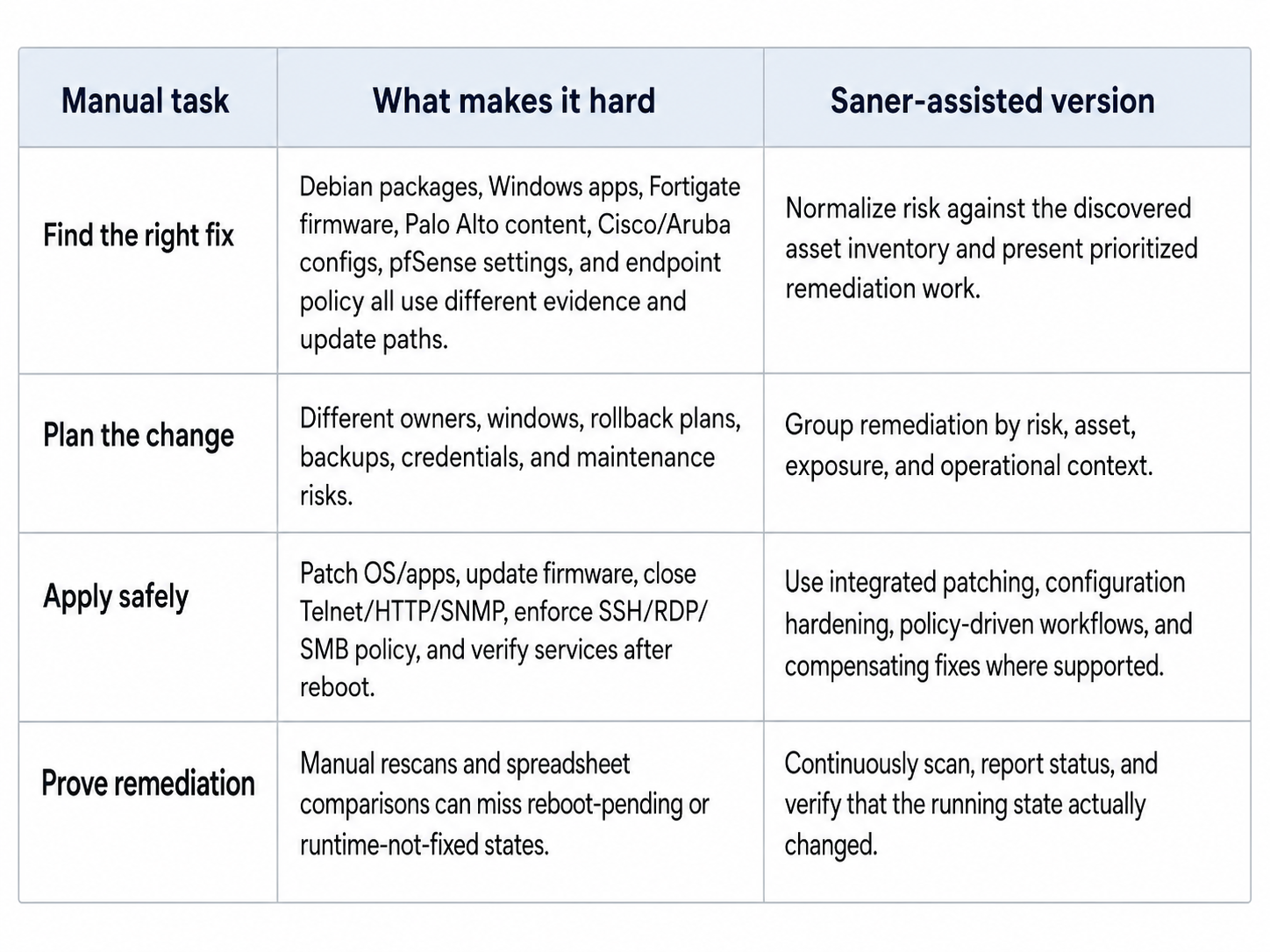
After fixes are applied, the question is no longer 'what did AI find?' The better question is 'what can AI still chain into impact?'
After Saner: the vulnerabilities were gone
Then I installed Saner and remediated the environment and asked the AI to look again. The clearest before-and-after example came from the Debian host, where the change was easy to measure: the vulnerability and missing-patch backlog the AI had leaned on simply went away.
What the before/after screenshot proves:
- Saner asset-vulnerability instances on the Debian proof point moved from 2,734 to 0 in the Saner output.
- Critical, high, medium, and low vulnerability instances all moved to 0 in that evidence set.
- Missing patch rows moved from 286 to 0, and live package-manager upgrades moved from 281 to 0 visible.
- The kernel, OpenSSH, Firefox ESR, WebKitGTK, and OpenSSL/libssl evidence also moved forward, reducing the old package/runtime attack surface.
Key confirmed before/after findings evidence
The before/after table showed the Debian vulnerability backlog moving from thousands of instances to zero reported instances, plus package and kernel movement to fixed versions.
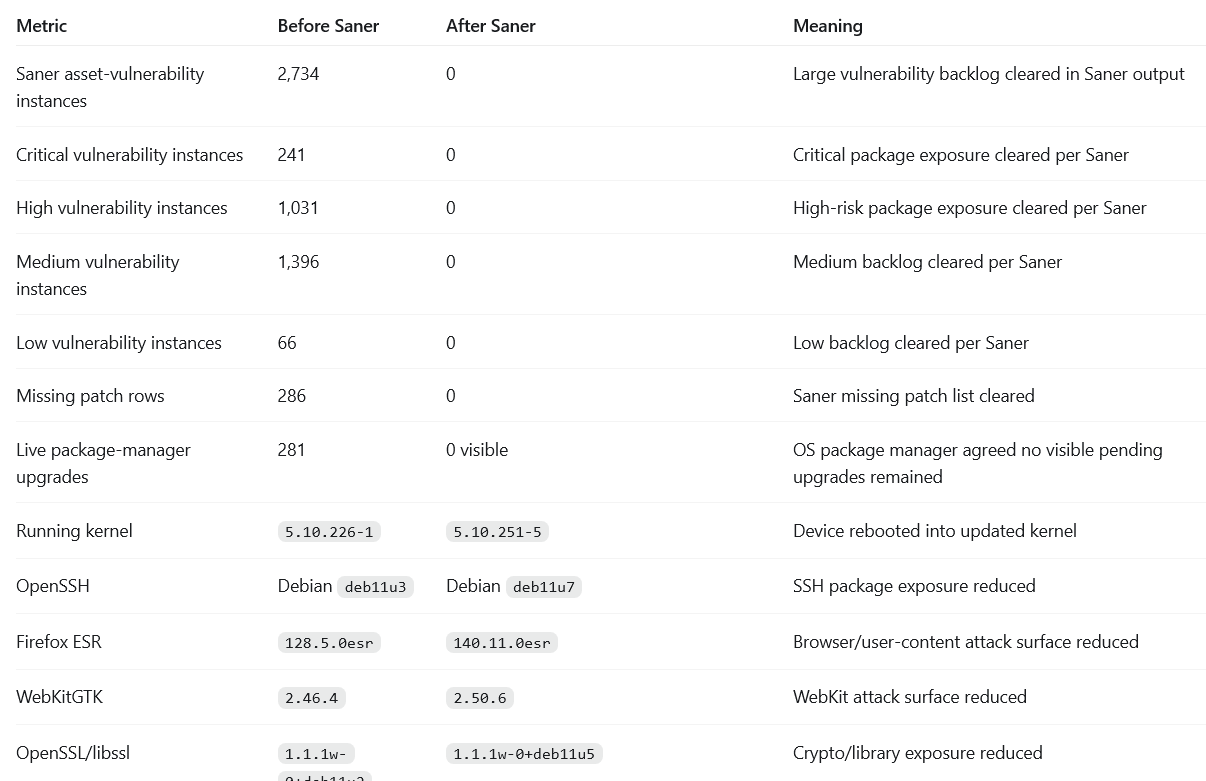
This is the important technical nuance from the lab: installed packages are not enough. The kernel example proved that a system can have a fixed package available or installed and still remain exploitable if it has not booted into the fixed runtime. The after-Saner story is stronger because runtime state was checked, not only package metadata.
But the misconfigurations were still there
A clean vulnerability scan did not mean the system was finished. When the AI looked again, it confirmed the patches had held — and then surfaced the next layer: misconfigurations, excessive privilege, unnecessary services, and drift. These are exactly the kinds of weakness an attacker can still chain together, and they were still wide open. This is where Saner goes past patching.
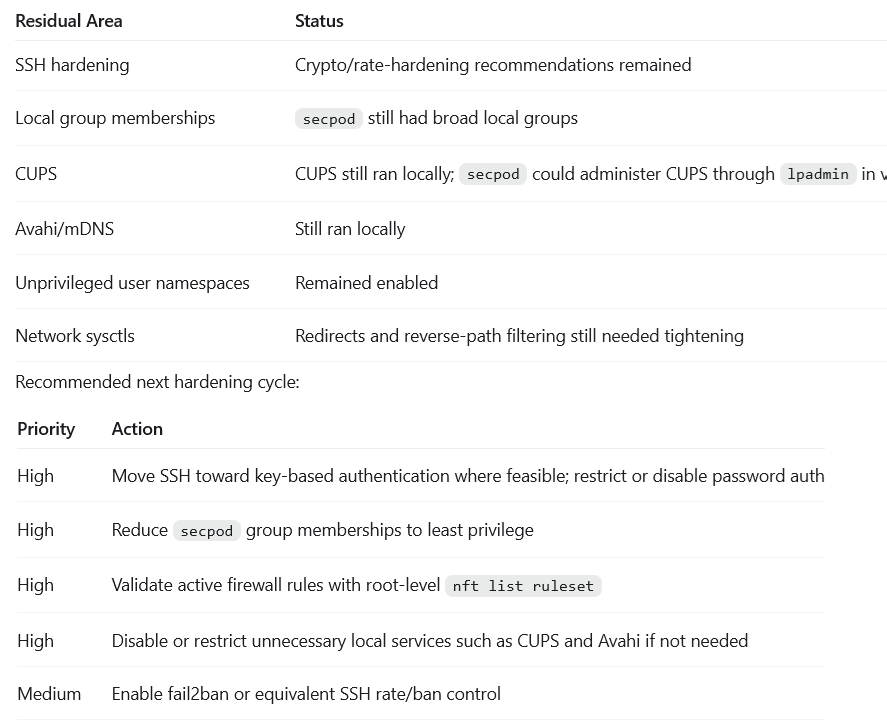
What the residual screenshot proves:
- The first remediation pass removed the large vulnerability backlog, but hardening work remained.
- SSH policy, local group memberships, CUPS, Avahi/mDNS, unprivileged user namespaces, network sysctls, firewall validation, and SSH rate/ban controls still needed attention.
- These are the kinds of residual conditions AI keeps checking after obvious CVE paths are closed.
Post-remediation residual risks evidence
The residual evidence showed SSH hardening, broad local groups, CUPS, Avahi/mDNS, user namespaces, network sysctls, firewall validation, and SSH rate/ban controls as the next hardening cycle.
Saner goes beyond vulnerabilities
Fixing the vulnerabilities was necessary, but it was not the end of prevention. So Saner went after the residual attack surface too, the misconfigurations, posture anomalies, weak controls, and drift that let small issues combine into real impact.
Saner goes beyond regular vulnerabilities by helping defenders identify and remediate misconfigurations, posture anomalies, weak controls, and drift. The goal is to reduce the conditions AI can chain, not only reduce the CVE count.
Misconfigurations
SSH policy, RDP/NLA, SMB signing, SNMP public, Telnet/HTTP management, password policy, CUPS administration, and firewall rules are examples of configuration issues that can become attack paths even when no new exploit is needed.
Posture anomalies
Devices whose posture differs from the expected baseline deserve attention: unexpected services, unusual settings, broad local groups, old queues/tasks, multiple app versions, and risky deviations from the intended server or workstation role.
Security controls
Defender hardening, ASR/PUA/CFA settings, host firewall, auditd, fail2ban, FIM, AppArmor profile coverage, service control, and compensating actions all matter after the patch backlog is gone.
Verification and deviations
Retest remediation, confirm residuals are fixed, preserve evidence, and keep watching so the same issue does not return after maintenance, package changes, or new services.
The final scan: three hours and forty minutes, nothing happened
Then I ran the AI one last time. This was the moment that mattered. Before hardening, it could walk straight from a finding to impact because the old roads were still open. Now it did not stop looking, but the work turned slow, wide, and unsuccessful.
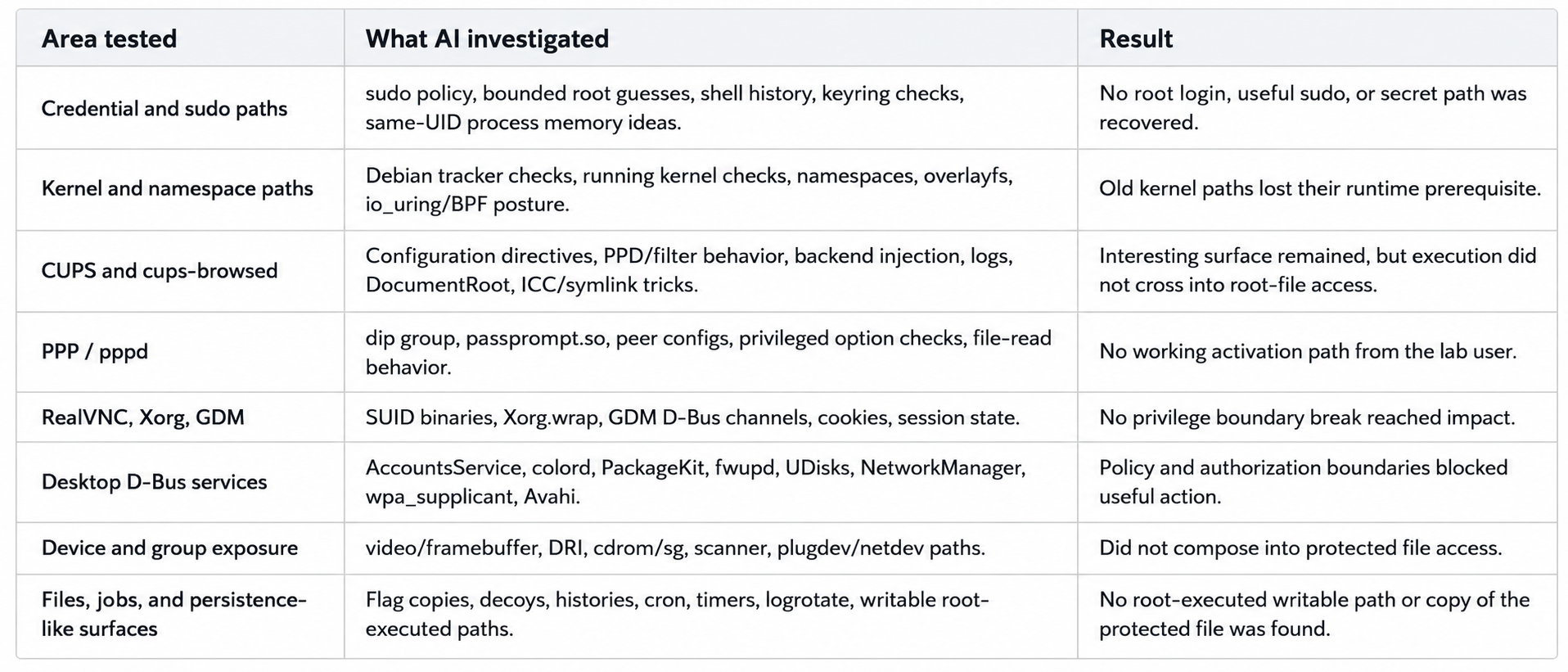
AI spent about 3 hours 40 minutes probing and pivoting after the fixes. It checked old assumptions, found that many of them were gone, then moved to nearby surfaces. It looked at credentials, sudo, kernel state, CUPS, PackageKit, D-Bus, PPP, VNC/X/GDM, device groups, files, logs, jobs, and service behavior. The result was not a new flag read. The result was blocked validation.
- Credential and sudo routes did not give the old shortcut.
- Kernel paths lost the vulnerable runtime prerequisite.
- CUPS and PackageKit still deserved review, but they no longer produced root-file access.
- Device groups, desktop services, D-Bus services, and local jobs gave AI things to inspect, but not a clean path to the protected file.
- The protected lab file stayed `root:root 0640`, and direct reads as the lab user failed
In simple words: Saner did not make AI stop testing. It made AI spend more time searching and still fail to produce the old impact.
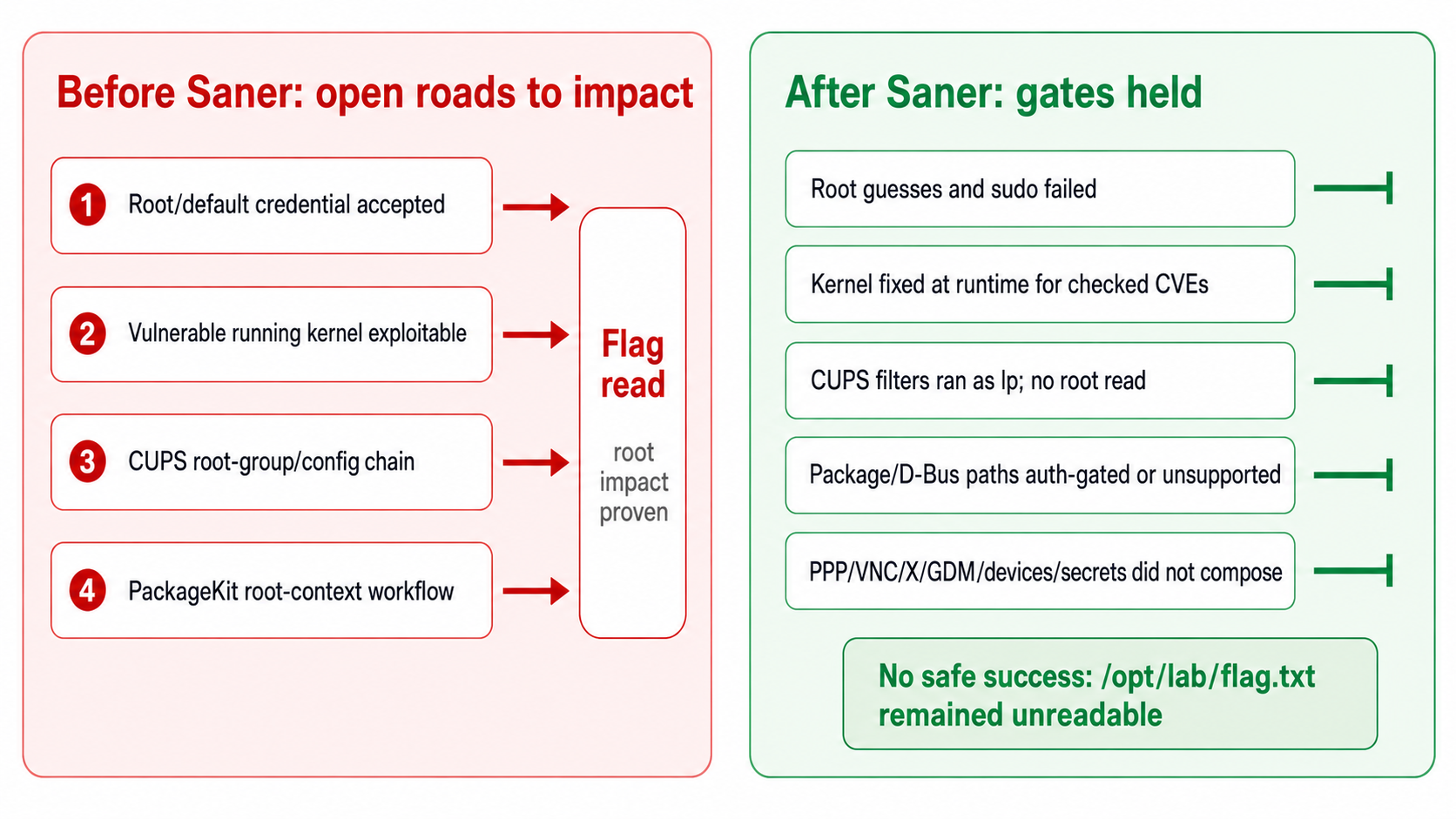
AI attack path remediation
The remediation diagram summarizes the change: old pre-Saner paths became blocked validation loops after remediation.
Everything the AI tried, but failed
The retest was not a single failed command. It was a broad negative validation pass. This matters because it shows increased attacker workload, not just one blocked route.
Saner can prevent attacks
Saner changes the operating model from periodic visibility to continuous remediation. In this lab, visibility alone was not enough. AI could use visibility to build a workflow. The defender advantage came from reducing the exposed conditions before they became easy paths.
The Saner operating loop maps naturally to the findings: discover what exists, prioritize what is reachable or likely to become impact, remediate vulnerabilities and misconfigurations, then verify remediation so drift does not rebuild the same attack surface.
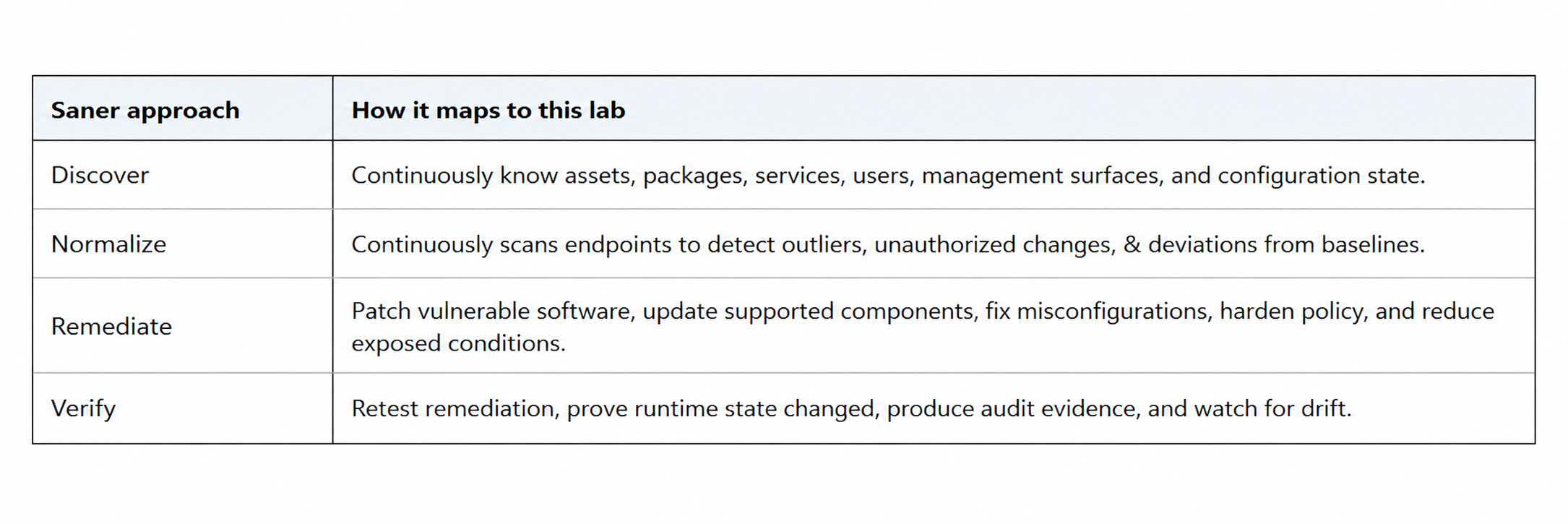
This aligns with SecPod's Prevention-first approach: continuously find vulnerabilities, misconfigurations, and risky conditions; prioritize the ones that matter; remediate them before exploitation; and keep validating so drift does not rebuild the same attack surface.
Choose Saner. Feel safe in the AI era
The lesson from this lab is not that AI is dangerous on its own. It is that weak systems become far easier to analyze, explain, and act on once an intelligent tool can connect the evidence in minutes instead of weeks.
Security teams should not panic. They should move earlier. Patch what is known. Remove what is unnecessary. Harden what is exposed. Fix misconfigurations and posture anomalies. Verify what changed. Watch for drift. That is prevention-first security in practice.